如何抓取维基百科. 完整初学者教程
维基百科拥有超过6000万篇文章,使其成为机器学习训练数据、研究数据集和竞争情报的宝贵资源。本教程指导你从提取第一篇文章到构建导航维基百科知识图谱的爬虫。你将学习提取标题、信息框、表格和图像引用,然后扩展到爬取整个主题集群。
Justinas Tamasevicius
1月 05日, 2026年
23 分钟阅读

为什么要抓取维基百科?
维基百科为以下五个业务和技术工作流程提供基础数据层:
- 市场情报和数据充实。数据团队使用维基百科来验证和充实内部数据库。通过提取结构化的信息框元数据,例如收入数字、总部或高管,你可以大规模标准化实体记录以进行竞争分析。
- 专业研究数据集。维基百科的官方数据库转储非常庞大(20GB以上)并且需要复杂的XML解析。抓取允许有针对性地提取特定表格,例如"标准普尔500指数公司列表",直接转换为干净的CSV以供立即分析。
- 为智能体工作流提供动力。自主代理需要可靠的基本事实数据来在采取行动之前验证事实。维基百科充当实体解析的主要参考层,允许代理在执行代码之前确认公司、人员或事件存在并被正确识别。
- 为SLM生成合成数据。本地运行的小型语言模型(SLM)需要高质量的文本来学习推理。维基百科为生成微调这些模型以进行指令跟随所需的人工智能(AI)训练数据提供结构化内容。
- GraphRAG和推理引擎。对于复杂查询,标准人工智能(AI)搜索正在发展为GraphRAG。这使用结构化数据(如你将抓取的信息框)来映射关系,允许人工智能(AI)理解不同文章之间的联系,而不仅仅是检索孤立的关键词。
了解维基百科的结构
维基百科的一致性使提取可预测。一旦你知道正确的CSS选择器,每篇文章都遵循相同的HTML模式。
维基百科文章结构
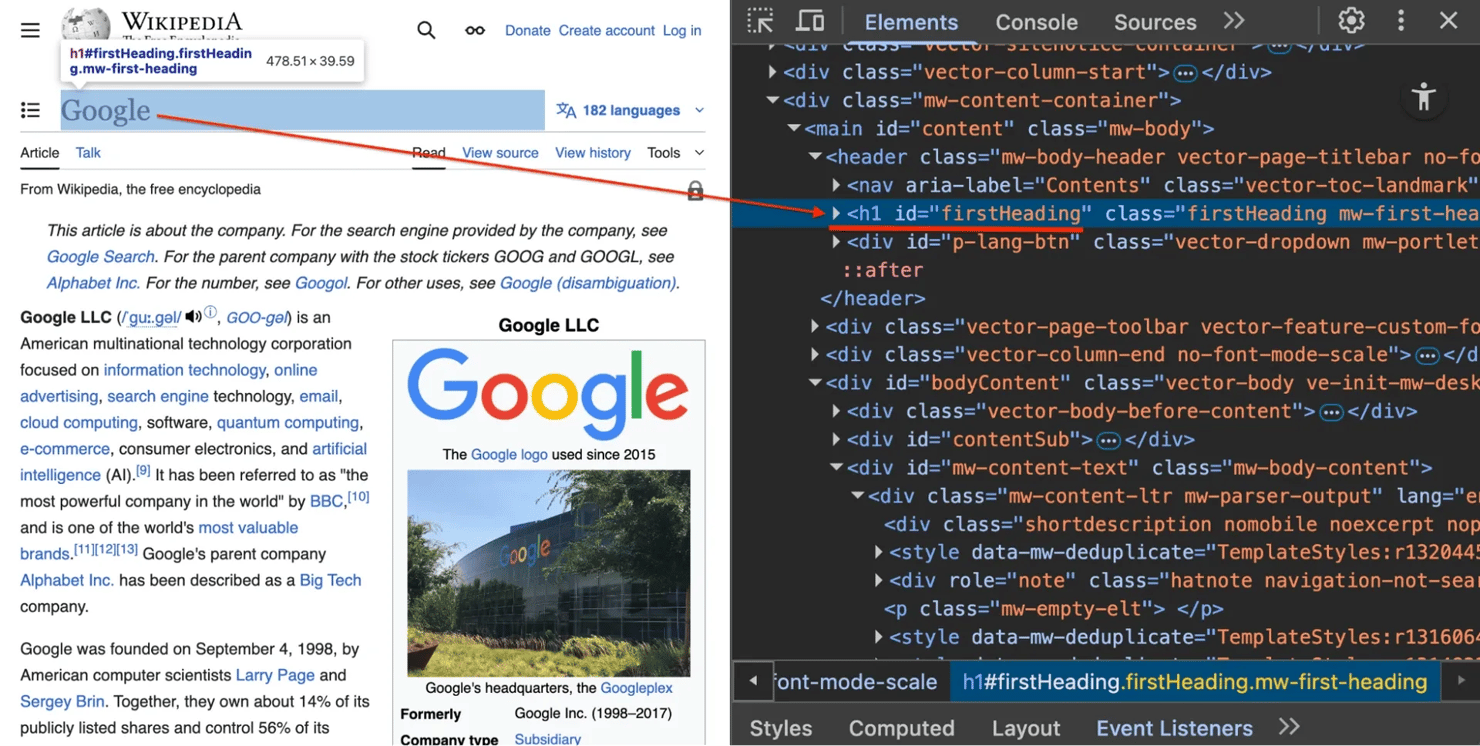
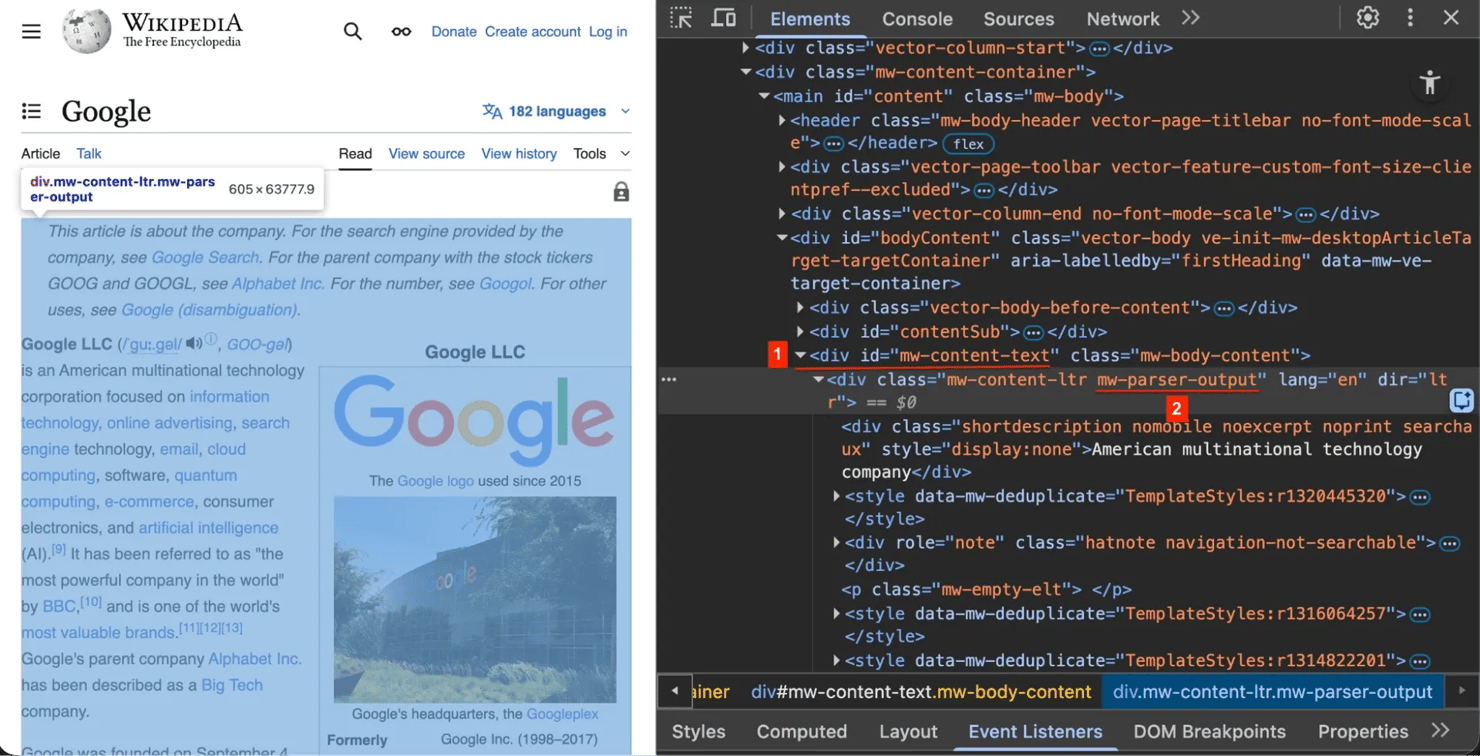
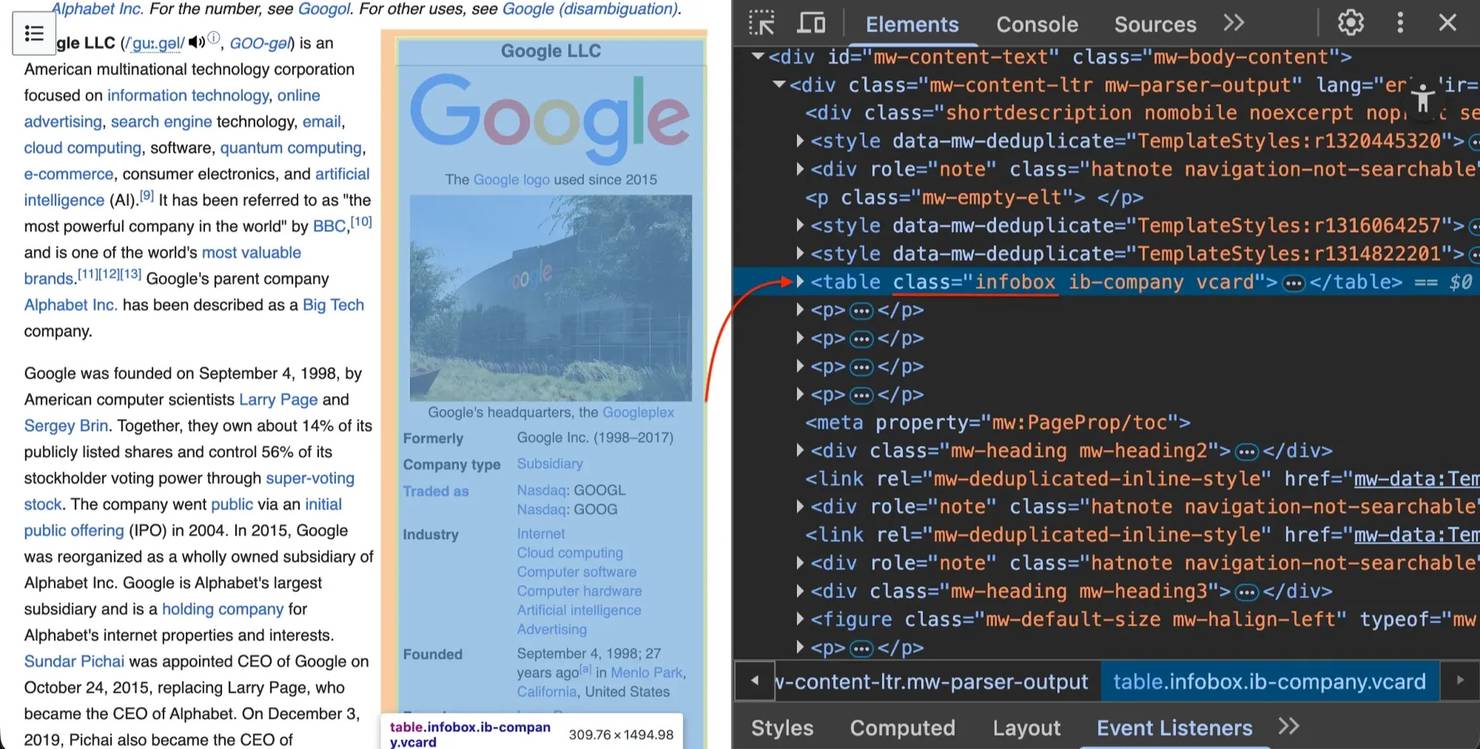
右键单击任何维基百科页面并选择"检查元素"(或在Windows上按F12 / Mac上按Cmd+Option+I)。你将看到以下关键结构元素:
1. 标题 #firstHeading – 每篇文章都使用此唯一ID作为主标题

2. 内容容器 .mw-parser-output – 实际文章文本包装在此类中。我们针对这个来避免抓取侧边栏菜单或页脚

3. 信息框 table.infobox – 右侧的此表包含结构化摘要数据(如创始人、行业或总部)
设置你的抓取环境
在构建抓取器之前,设置一个隔离的Python环境以避免依赖冲突。
前提条件
确保你有:
- 已安装Python 3.9+
- 基本的终端/命令行知识
- 文本编辑器(VS Code、PyCharm等)
创建虚拟环境
创建并激活虚拟环境:
# Create virtual environmentpython -m venv wikipedia-env# Activate it# macOS/Linux:source wikipedia-env/bin/activate# Windows Command Prompt:wikipedia-env\Scripts\activate.bat# Windows PowerShell:wikipedia-env\Scripts\Activate.ps1
安装所需库
安装必要的库:
pip install requests beautifulsoup4 lxml html2text pandas
库分解:
requests – 发送HTTP请求并支持配置连接重试
beautifulsoup4 – 解析HTML并导航文档树
lxml – 高性能XML和HTML解析器,可加快Beautiful Soup速度
pandas – 用于将表格提取到CSV的数据分析库
html2text – 将HTML转换为Markdown格式
冻结依赖项
保存你的库版本以使抓取器可共享:
pip freeze > requirements.txt
构建维基百科抓取器
让我们分步构建维基百科抓取器。打开代码编辑器并创建名为wiki_scraper.py的文件。
步骤1. 导入库并配置重试
良好的抓取器需要处理网络错误。首先导入库并设置具有重试逻辑的会话。
将此复制到wiki_scraper.py中:
import requestsfrom bs4 import BeautifulSoupimport html2textimport pandas as pdimport io, os, re, json, randomfrom requests.adapters import HTTPAdapterfrom urllib3.util.retry import Retry# Rotate user agents to mimic different browsersUSER_AGENTS = ["Mozilla/5.0 (Macintosh; Intel Mac OS X 10_15_7) AppleWebKit/537.36 (KHTML, like Gecko) Chrome/143.0.0.0 Safari/537.36","Mozilla/5.0 (Windows NT 10.0; Win64; x64) AppleWebKit/537.36 (KHTML, like Gecko) Chrome/119.0.0.0 Safari/537.36",]def get_session():"""Create a requests session with automatic retry on server errors"""session = requests.Session()# Retry on server errors (5xx) and rate limit errors (429)retry = Retry(total=3,backoff_factor=1,status_forcelist=[429, 500, 502, 503, 504],allowed_methods=["GET"],)adapter = HTTPAdapter(max_retries=retry)session.mount("https://", adapter)return sessionSESSION = get_session()
关键组件:
- 用户代理。网站阻止默认的Python requests用户代理(python-requests/X.X.X)。这些标头将请求识别为来自Chrome浏览器,防止自动化阻止。
- 会话对象。从池中重用TCP连接,而不是为每个请求创建新连接,显著提高速度。
- 重试逻辑。在服务器错误(500、502、503、504)和速率限制(429)时使用指数退避自动重试最多3次。
步骤2. 提取信息框和表格
为特定提取任务创建辅助函数。
添加extract_infobox函数:
def extract_infobox(soup):"""Extract structured data from Wikipedia infobox"""box = soup.select_one("table.infobox")if not box:return Nonedata = {}# Extract titletitle = box.select_one(".infobox-above, .fn")if title:data["title"] = title.get_text(strip=True)# Extract key-value pairsfor row in box.find_all("tr"):label = row.select_one("th.infobox-label, th.infobox-header")value = row.select_one("td.infobox-data, td")if label and value:# Regex cleaning: Remove special chars to make a valid JSON keykey = re.sub(r"[^\w\s-]", "", label.get_text(strip=True)).strip()if key:data[key] = value.get_text(separator=" ", strip=True)return data
soup.select_one(“table.infobox”)查找第一个具有类infobox的表,如果未找到则返回None(函数继续而不会崩溃)。re.sub(…)正则表达式从键中删除特殊字符 – 像"Born:"或"Height?"这样的标签不能与Python中的点表示法一起使用(data.Born:是无效语法)。我们使用数据清理将它们转换为有效标识符。
添加extract_tables函数:
def extract_tables(soup, folder):"""Extract Wikipedia tables and save as CSV files"""tables = soup.select("table.wikitable")if not tables:return 0os.makedirs(f"{folder}/tables", exist_ok=True)table_count = 0for table in tables:try:dfs = pd.read_html(io.StringIO(str(table)))if dfs:table_count += 1dfs[0].to_csv(f"{folder}/tables/table_{table_count}.csv", index=False)except Exception:passreturn table_count
维基百科使用table.wikitable作为数据表的标准类。pd.read_html()函数在较新的pandas版本中需要包装在io.StringIO中的HTML字符串(较旧版本接受原始字符串,但现在显示弃用警告)。该函数将HTML表转换为pandas DataFrame,然后保存为CSV文件。try-except块捕获所有pandas解析错误 – 转换失败的表会被默默跳过。
步骤3. 构建scrape_page函数
将所有内容组合到一个管道中:获取 → 解析 → 清理 → 保存。
添加scrape_page函数:
def scrape_page(url):# 1. Fetchheaders = {"User-Agent": random.choice(USER_AGENTS)}try:response = SESSION.get(url, headers=headers, timeout=15)except Exception as e:print(f"Error: {e}")return None# 2. Parsesoup = BeautifulSoup(response.content, "lxml")# 3. Setup output foldertitle_elem = soup.find("h1", id="firstHeading")title = title_elem.get_text(strip=True) if title_elem else "Unknown"safe_title = re.sub(r"[^\w\-_]", "_", title)output_folder = f"Output_{safe_title}"os.makedirs(output_folder, exist_ok=True)# 4. Extract structured data (before cleaning!)infobox = extract_infobox(soup)if infobox:with open(f"{output_folder}/infobox.json", "w", encoding="utf-8") as f:json.dump(infobox, f, indent=2, ensure_ascii=False)extract_tables(soup, output_folder)# 5. Clean and convert to Markdowncontent = soup.select_one("#mw-content-text .mw-parser-output")# Remove noise elements so they don't appear in the textjunk = [".navbox", ".reflist", ".reference", ".hatnote", ".ambox"]for selector in junk:for el in content.select(selector):el.decompose()h = html2text.HTML2Text()h.body_width = 0 # No wrappingmarkdown_content = h.handle(str(content))with open(f"{output_folder}/content.md", "w", encoding="utf-8") as f:f.write(f"# {title}\n\n{markdown_content}")print(f"Scraped: {title}")return {"soup": soup, "title": title}if __name__ == "__main__":scrape_page("https://en.wikipedia.org/wiki/Google")
该函数使用random.choice()轮换用户代理,以在不同的浏览器身份之间分配请求,使流量模式不那么容易被检测。15秒超时防止抓取器在慢速连接上无限期挂起 – 超时会引发被捕获和打印的异常。当抓取失败时,该函数返回None,允许爬虫优雅地处理错误。
我们使用response.content(原始字节)而不是response.text,因为lxml解析器使用二进制输入更可靠地处理编码检测。get_text(strip=True)方法从标题中删除前导和尾随空格,这对于创建干净的文件夹名称至关重要。
safe_title正则表达式将不是单词字符、连字符或下划线的任何字符替换为下划线 – 这可以防止包含斜杠、冒号或星号等在操作系统中文件夹名称中无效的字符的标题导致文件系统错误。
保存信息框JSON时,indent=2创建可读的、漂亮打印的输出,ensure_ascii=False保留Unicode字符,这对于数据中的非英语名称和特殊字符是必需的。
抓取顺序很关键:首先提取结构化数据(信息框、表格),然后删除维基百科的导航和元数据元素。junk选择器针对导航框、参考列表、引文上标、消歧通知和文章维护警告。我们使用decompose()在转换为Markdown之前从树中完全删除这些元素,确保干净的输出,没有导航混乱。
h.body_width = 0设置禁用html2text的默认78字符行换行,保留维基百科内容的原始结构,这对于下游处理和人工智能(AI)训练数据更好。
该函数返回包含BeautifulSoup对象和标题的字典 – 当我们添加爬取功能时,我们需要soup对象进行链接提取。
测试抓取器
运行脚本:
python wiki_scraper.py
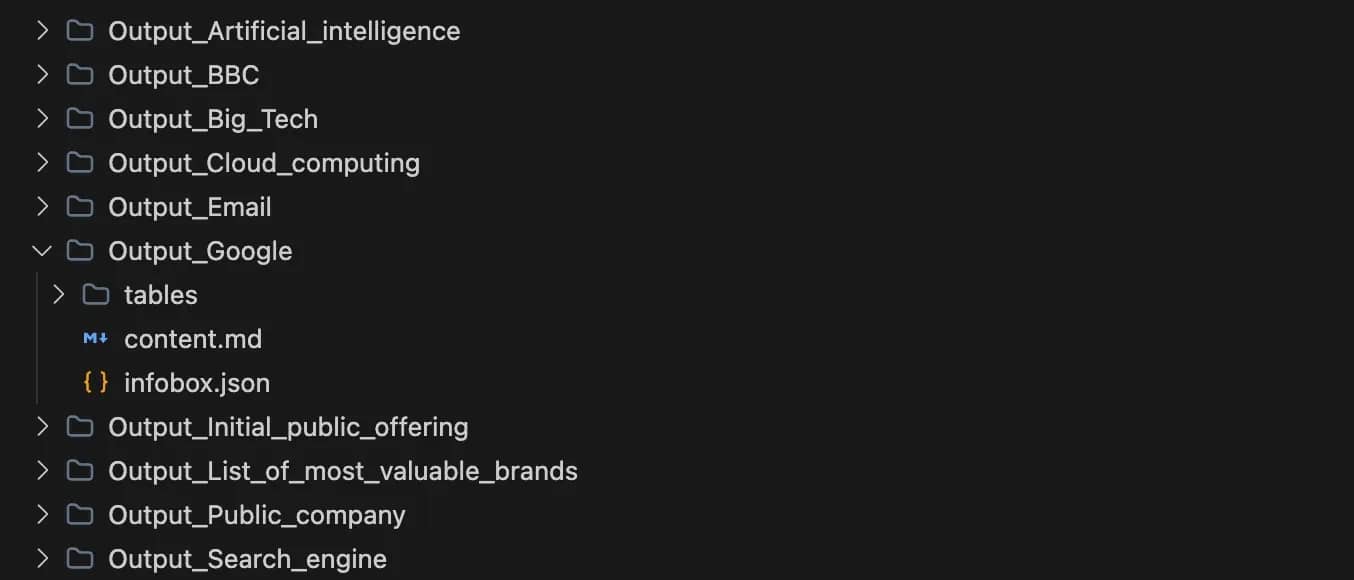
你将看到一个名为Output_Google的新文件夹,其中包含:
- infobox.json – 来自维基百科信息框的结构化元数据
- tables/ – 所有维基百科表格提取为CSV文件
- content.md – Markdown格式的完整文章
信息框的JSON结构:
{"title": "Google LLC","Formerly": "Google Inc. (1998-2017)","Company type": "Subsidiary","Traded as": "Nasdaq : GOOGL Nasdaq : GOOG","Industry": "Internet Cloud computing Computer software Computer hardware Artificial intelligence Advertising","Founded": "September 4, 1998 ; 27 years ago ( 1998-09-04 ) [ a ] in Menlo Park , California , United States","Founders": "Larry Page Sergey Brin","Headquarters": "Googleplex , Mountain View, California , U.S.","Area served": "Worldwide","Key people": "John L. Hennessy ( Chairman ) Sundar Pichai ( CEO ) Ruth Porat ( President and CIO ) Anat Ashkenazi ( CFO )","Products": "Google Search Android Nest Pixel Workspace Fitbit Waze YouTube Gemini Full list","Number of employees": "187,000 (2022)","Parent": "Alphabet Inc.","Subsidiaries": "Adscape Cameyo Charleston Road Registry Endoxon FeedBurner ImageAmerica Kaltix Nest Labs reCAPTCHA X Development YouTube ZipDash","ASN": "15169","Website": "about .google"}
示例表格数据(CSV格式):
SN,City,Country or U.S. state1.0,Ann Arbor,Michigan2.0,Atlanta,Georgia3.0,Austin,Texas4.0,Boulder,Colorado5.0,Boulder - Pearl Place,Colorado6.0,Boulder - Walnut,Colorado7.0,Cambridge,Massachusetts8.0,Chapel Hill,North Carolina9.0,Chicago - Carpenter,Illinois10.0,Chicago - Fulton Market,Illinois
Markdown输出(content.md):
**Google LLC** ([/ˈɡuː.ɡəl/](/wiki/Help:IPA/English "Help:IPA/English") [](//upload.wikimedia.org/wikipedia/commons/transcoded/3/3d/En-us-googol.ogg/En-us-googol.ogg.mp3 "Play audio")[ⓘ](/wiki/File:En-us-googol.ogg "File:En-us-googol.ogg"), [_GOO -gəl_](/wiki/Help:Pronunciation_respelling_key "Help:Pronunciation respelling key")) is an American multinational technology corporation focused on...Google was founded on September 4, 1998, by American computer scientists [Larry Page](/wiki/Larry_Page "Larry Page") and [Sergey Brin](/wiki/Sergey_Brin "Sergey Brin"). Together, they own about 14% of its publicly listed shares and control 56% of its stockholder voting power through [super-voting stock](/wiki/Super-voting_stock "Super-voting stock"). The company went [public](/wiki/Public_company "Public company") via an [initial public offering](/wiki/Initial_public_offering "Initial public offering") (IPO) in 2004...## History### Early yearsGoogle began in January 1996 as a research project by [Larry Page](/wiki/Larry_Page "Larry Page") and [Sergey Brin](/wiki/Sergey_Brin "Sergey Brin") while they were both [PhD](/wiki/PhD "PhD") students at [Stanford University](/wiki/Stanford_University "Stanford University") in [California](/wiki/California "California"), United States...
构建维基百科爬虫
现在我们有了一个从单个维基百科页面提取数据的工作抓取器,让我们扩展它以自动发现和抓取相关主题。这将我们的单页抓取器转变为可以映射文章之间连接的爬虫,创建相关概念的数据集。
基本爬虫跟随页面上的每个链接。在维基百科上,这是有问题的 – 如果你从"Python"开始并跟随每个链接,你会在几秒钟内抓取"1991年科学"和"荷兰"。仅Python文章就包含超过1,000个链接,跟随所有这些链接会迅速失控。
为了有效地收集相关主题,我们需要一个专注于概念相关链接的选择性爬虫。我们将分三部分构建:URL验证、智能链接提取和爬取循环。
步骤4. 爬虫设置和验证
在wiki_scraper.py顶部更新你的导入:
import requestsfrom bs4 import BeautifulSoupimport html2textimport pandas as pdimport io, os, re, json, random, timefrom requests.adapters import HTTPAdapterfrom urllib3.util.retry import Retryfrom urllib.parse import urlparse, urljoinfrom collections import dequeimport argparse
在extract_tables函数下方添加这些验证函数:
def normalize_url(url):"""Standardizes URLs (removes fragments like #history)"""if not url:return None# Handle protocol-relative URLs (common on Wikipedia)if url.startswith("//"):url = "https:" + urlparsed = urlparse(url)return f"{parsed.scheme}://{parsed.netloc.lower()}{parsed.path}"def is_valid_wikipedia_link(url):"""Filters out special pages (Files, Talk, Help)"""if not url:return Falseparsed = urlparse(url)if "wikipedia.org" not in parsed.netloc:return False# We only want articles, not maintenance pagesskip = ["/wiki/Special:","/wiki/File:","/wiki/Help:","/wiki/User:","/wiki/Talk:",]return not any(parsed.path.startswith(p) for p in skip)
normalize_url函数剥离URL片段(如#History),因此我们将每个页面视为一个唯一的URL。维基百科经常使用协议相对URL,如//upload.wikimedia.org,此函数将其转换为适当的HTTPS URL。is_valid_wikipedia_link函数过滤掉维护页面、特殊页面、用户页面和讨论页面,只保留文章内容。
步骤5. 从关键部分提取链接
添加专注于前几个段落和"另见"部分的链接提取函数:
def extract_links(soup, base_url):links = set()# Target the main article bodycontent = soup.select_one("#mw-content-text .mw-parser-output")if not content:return links# 1. Early paragraphs: Scan only first 3 paragraphs for high-level conceptsfor p in content.find_all("p", recursive=False, limit=3):for link in p.find_all("a", href=True):url = urljoin(base_url, link["href"])if is_valid_wikipedia_link(url):links.add(normalize_url(url))# 2. "See Also": Find the header and grab all links in that sectionfor heading in soup.find_all(["h2", "h3"]):if "see also" in heading.get_text().lower():# Get all elements after the heading until the next headingcurrent = heading.find_next_sibling()while current and current.name not in ["h2", "h3"]:for link in current.find_all("a", href=True):url = urljoin(base_url, link["href"])if is_valid_wikipedia_link(url):links.add(normalize_url(url))current = current.find_next_sibling()break # Stop once we've processed the sectionreturn links
recursive=False, limit=3参数告诉Beautiful Soup只检查顶级段落并在第三个段落后停止。这通常捕获开头中链接的关键概念。我们专注于这些部分,因为:
前3个段落通常包含最重要的相关概念(例如,"Google"文章提到Alphabet Inc.、Larry Page、搜索引擎)
在"另见"部分,维基百科编辑在这里手动策划相关主题,提供高质量的连接
此策略避免了来自脚注链接、导航元素和内容深处提到的切向相关文章的噪音。
步骤6. 创建爬虫类
添加使用广度优先(BFS)搜索来探索相关页面的爬虫类:
class WikipediaCrawler:def __init__(self, start_url, max_pages=5, max_depth=2):# The queue stores tuples: (URL, Depth)self.queue = deque([(normalize_url(start_url), 0)])self.visited = set()self.max_pages = max_pagesself.max_depth = max_depthdef crawl(self):count = 0while self.queue and count < self.max_pages:# Get the next URL from the front of the queueurl, depth = self.queue.popleft()# Skip if we've already scraped thisif url in self.visited:continue# Skip if we've exceeded max depthif depth > self.max_depth:continueprint(f"[{count+1}/{self.max_pages}] [Depth {depth}] Crawling: {url}")# 1. Scrape the pagedata = scrape_page(url)self.visited.add(url)count += 1# 2. Find new links (if the scrape was successful)if data and data.get("soup"):new_links = extract_links(data["soup"], url)for link in new_links:if link not in self.visited:self.queue.append((link, depth + 1))# 3. Rate limitingtime.sleep(1.5)
deque(双端队列)允许使用popleft()有效地从前面删除URL,实现广度优先搜索(FIFO – 先进先出)。这意味着爬虫逐级探索页面,而不是深入到一个分支。广度优先搜索确保你在与起点相似的概念距离处获得多样化的相关主题集,而不是跟随单一链接链非常深入到一个特定的子主题。
爬虫跟踪深度以防止深入到切向主题:
- 深度0 – 起始页(例如"Google")
- 深度1 – 从起点直接链接的页面(例如"Alphabet Inc."、“Larry Page”、“Android”)
- 深度2 – 从深度1链接的页面(例如"Stanford University"、“Java”、“Chromium”)
visited集防止重复抓取 – 如果"Python"链接到"C++"并且"C++“链接回"Python”,我们不会抓取"Python"两次。time.sleep(1.5)暂停防止用快速请求压垮维基百科的服务器。if data and data.get(‘soup’)检查处理抓取失败的情况(网络错误、404页面等) – 爬虫继续处理其他页面而不会崩溃。
请注意,即使使用max_depth限制,队列也可能显著增长。在深度1时,队列可能包含20-50个URL。在深度2时,它可能包含200-500+个URL。visited集防止重新抓取,但所有唯一URL都会添加到队列中,直到达到max_pages或队列耗尽。
步骤7. 设置命令行界面
用此CLI实现替换wiki_scraper.py底部现有的if name == “main”:块:
if __name__ == "__main__":parser = argparse.ArgumentParser()parser.add_argument("url", help="Wikipedia article URL")parser.add_argument("--crawl", action="store_true", help="Enable crawler mode")parser.add_argument("--max-pages", type=int, default=5, help="Maximum pages to scrape")parser.add_argument("--max-depth", type=int, default=2, help="Maximum crawl depth")args = parser.parse_args()if args.crawl:WikipediaCrawler(args.url, max_pages=args.max_pages, max_depth=args.max_depth).crawl()else:scrape_page(args.url)
测试抓取器和爬虫
在包含wiki_scraper.py的文件夹中打开终端。
单页模式 – 抓取一篇文章:
python wiki_scraper.py "https://en.wikipedia.org/wiki/Google"
这会创建一个Output_Google文件夹,其中包含content.md、infobox.json和一个包含CSV文件的tables/目录。
爬虫模式 – 收集相关主题:
python wiki_scraper.py "https://en.wikipedia.org/wiki/Google" --crawl --max-pages 10 --max-depth 2
脚本在发现并抓取相关页面时,会通过深度指示器显示进度。以下是典型爬取过程的示意图:
[1/10] [Depth 0] Crawling: https://en.wikipedia.org/wiki/GoogleScraped: Google[2/10] [Depth 1] Crawling: https://en.wikipedia.org/wiki/Initial_public_offeringScraped: Initial public offering[3/10] [Depth 1] Crawling: https://en.wikipedia.org/wiki/E-commerceScraped: E-commerce[4/10] [Depth 1] Crawling: https://en.wikipedia.org/wiki/Search_engineScraped: Search engine[5/10] [Depth 1] Crawling: https://en.wikipedia.org/wiki/BBCScraped: BBC[6/10] [Depth 1] Crawling: https://en.wikipedia.org/wiki/Public_companyScraped: Public company[7/10] [Depth 1] Crawling: https://en.wikipedia.org/wiki/Super-voting_stockScraped: Super-voting stock[8/10] [Depth 1] Crawling: https://en.wikipedia.org/wiki/Larry_PageScraped: Larry Page[9/10] [Depth 1] Crawling: https://en.wikipedia.org/wiki/Sundar_PichaiScraped: Sundar Pichai[10/10] [Depth 1] Crawling: https://en.wikipedia.org/wiki/Sergey_BrinScraped: Sergey Brin
[1/10] [Depth 0] Crawling: https://en.wikipedia.org/wiki/GoogleScraped: Google[2/10] [Depth 1] Crawling: https://en.wikipedia.org/wiki/Initial_public_offeringScraped: Initial public offering[3/10] [Depth 1] Crawling: https://en.wikipedia.org/wiki/E-commerceScraped: E-commerce[4/10] [Depth 1] Crawling: https://en.wikipedia.org/wiki/Search_engineScraped: Search engine[5/10] [Depth 1] Crawling: https://en.wikipedia.org/wiki/BBCScraped: BBC[6/10] [Depth 1] Crawling: https://en.wikipedia.org/wiki/Public_companyScraped: Public company[7/10] [Depth 1] Crawling: https://en.wikipedia.org/wiki/Super-voting_stockScraped: Super-voting stock[8/10] [Depth 1] Crawling: https://en.wikipedia.org/wiki/Larry_PageScraped: Larry Page[9/10] [Depth 1] Crawling: https://en.wikipedia.org/wiki/Sundar_PichaiScraped: Sundar Pichai[10/10] [Depth 1] Crawling: https://en.wikipedia.org/wiki/Sergey_BrinScraped: Sergey Brin
完成后,您将获得最多10个独立的Output_*文件夹,每个文件夹包含该主题的完整提取数据。当爬虫达到max_depth深度限制且无更多链接可探索时,实际抓取的页面数量可能少于max_pages。
以下是爬取完成后的输出文件夹结构示例:
完整源代码
以下是完整的脚本供参考。您可以直接将此内容复制粘贴到wiki_scraper.py文件中。
import requestsfrom bs4 import BeautifulSoupimport html2textimport pandas as pdimport io, os, re, json, random, timefrom requests.adapters import HTTPAdapterfrom urllib3.util.retry import Retryfrom urllib.parse import urlparse, urljoinfrom collections import dequeimport argparse# Rotate user agents to mimic different browsersUSER_AGENTS = ["Mozilla/5.0 (Macintosh; Intel Mac OS X 10_15_7) AppleWebKit/537.36 (KHTML, like Gecko) Chrome/143.0.0.0 Safari/537.36","Mozilla/5.0 (Windows NT 10.0; Win64; x64) AppleWebKit/537.36 (KHTML, like Gecko) Chrome/119.0.0.0 Safari/537.36",]def get_session():"""Create a requests session with automatic retry on server errors"""session = requests.Session()# Retry on server errors (5xx) and rate limit errors (429)retry = Retry(total=3,backoff_factor=1,status_forcelist=[429, 500, 502, 503, 504],allowed_methods=["GET"],)adapter = HTTPAdapter(max_retries=retry)session.mount("https://", adapter)return sessionSESSION = get_session()def extract_infobox(soup):"""Extract structured data from Wikipedia infobox"""box = soup.select_one("table.infobox")if not box:return Nonedata = {}# Extract titletitle = box.select_one(".infobox-above, .fn")if title:data["title"] = title.get_text(strip=True)# Extract key-value pairsfor row in box.find_all("tr"):label = row.select_one("th.infobox-label, th.infobox-header")value = row.select_one("td.infobox-data, td")if label and value:# Regex cleaning: Remove special chars to make a valid JSON keykey = re.sub(r"[^\w\s-]", "", label.get_text(strip=True)).strip()if key:data[key] = value.get_text(separator=" ", strip=True)return datadef extract_tables(soup, folder):"""Extract Wikipedia tables and save as CSV files"""tables = soup.select("table.wikitable")if not tables:return 0os.makedirs(f"{folder}/tables", exist_ok=True)table_count = 0for table in tables:try:dfs = pd.read_html(io.StringIO(str(table)))if dfs:table_count += 1dfs[0].to_csv(f"{folder}/tables/table_{table_count}.csv", index=False)except Exception:passreturn table_countdef normalize_url(url):"""Standardizes URLs (removes fragments like #history)"""if not url:return None# Handle protocol-relative URLs (common on Wikipedia)if url.startswith("//"):url = "https:" + urlparsed = urlparse(url)return f"{parsed.scheme}://{parsed.netloc.lower()}{parsed.path}"def is_valid_wikipedia_link(url):"""Filters out special pages (Files, Talk, Help)"""if not url:return Falseparsed = urlparse(url)if "wikipedia.org" not in parsed.netloc:return False# We only want articles, not maintenance pagesskip = ["/wiki/Special:","/wiki/File:","/wiki/Help:","/wiki/User:","/wiki/Talk:",]return not any(parsed.path.startswith(p) for p in skip)def extract_links(soup, base_url):links = set()# Target the main article bodycontent = soup.select_one("#mw-content-text .mw-parser-output")if not content:return links# 1. Early paragraphs: Scan only first 3 paragraphs for high-level conceptsfor p in content.find_all("p", recursive=False, limit=3):for link in p.find_all("a", href=True):url = urljoin(base_url, link["href"])if is_valid_wikipedia_link(url):links.add(normalize_url(url))# 2. "See Also": Find the header and grab all links in that sectionfor heading in soup.find_all(["h2", "h3"]):if "see also" in heading.get_text().lower():# Get all elements after the heading until the next headingcurrent = heading.find_next_sibling()while current and current.name not in ["h2", "h3"]:for link in current.find_all("a", href=True):url = urljoin(base_url, link["href"])if is_valid_wikipedia_link(url):links.add(normalize_url(url))current = current.find_next_sibling()break # Stop once we've processed the sectionreturn linksclass WikipediaCrawler:def __init__(self, start_url, max_pages=5, max_depth=2):# The queue stores tuples: (URL, Depth)self.queue = deque([(normalize_url(start_url), 0)])self.visited = set()self.max_pages = max_pagesself.max_depth = max_depthdef crawl(self):count = 0while self.queue and count < self.max_pages:# Get the next URL from the front of the queueurl, depth = self.queue.popleft()# Skip if we've already scraped thisif url in self.visited:continue# Skip if we've exceeded max depthif depth > self.max_depth:continueprint(f"[{count+1}/{self.max_pages}] [Depth {depth}] Crawling: {url}")# 1. Scrape the pagedata = scrape_page(url)self.visited.add(url)count += 1# 2. Find new links (if the scrape was successful)if data and data.get("soup"):new_links = extract_links(data["soup"], url)for link in new_links:if link not in self.visited:self.queue.append((link, depth + 1))# 3. Rate limitingtime.sleep(1.5)def scrape_page(url):# 1. Fetchheaders = {"User-Agent": random.choice(USER_AGENTS)}try:response = SESSION.get(url, headers=headers, timeout=15)except Exception as e:print(f"Error: {e}")return None# 2. Parsesoup = BeautifulSoup(response.content, "lxml")# 3. Setup output foldertitle_elem = soup.find("h1", id="firstHeading")title = title_elem.get_text(strip=True) if title_elem else "Unknown"safe_title = re.sub(r"[^\w\-_]", "_", title)output_folder = f"Output_{safe_title}"os.makedirs(output_folder, exist_ok=True)# 4. Extract structured data (before cleaning!)infobox = extract_infobox(soup)if infobox:with open(f"{output_folder}/infobox.json", "w", encoding="utf-8") as f:json.dump(infobox, f, indent=2, ensure_ascii=False)extract_tables(soup, output_folder)# 5. Clean and convert to Markdowncontent = soup.select_one("#mw-content-text .mw-parser-output")# Remove noise elements so they don't appear in the textjunk = [".navbox", ".reflist", ".reference", ".hatnote", ".ambox"]for selector in junk:for el in content.select(selector):el.decompose()h = html2text.HTML2Text()h.body_width = 0 # No wrappingmarkdown_content = h.handle(str(content))with open(f"{output_folder}/content.md", "w", encoding="utf-8") as f:f.write(f"# {title}\n\n{markdown_content}")print(f"Scraped: {title}")return {"soup": soup, "title": title}if __name__ == "__main__":parser = argparse.ArgumentParser()parser.add_argument("url", help="Wikipedia article URL")parser.add_argument("--crawl", action="store_true", help="Enable crawler mode")parser.add_argument("--max-pages", type=int, default=5, help="Maximum pages to scrape")parser.add_argument("--max-depth", type=int, default=2, help="Maximum crawl depth")args = parser.parse_args()if args.crawl:WikipediaCrawler(args.url, max_pages=args.max_pages, max_depth=args.max_depth).crawl()else:scrape_page(args.url)
故障排除常见问题
维基百科不断更新其布局,并且会发生网络问题。以下是最常见的错误及其修复方法。
1. AttributeError: ‘NoneType’ object has no attribute ‘text’
原因:你的脚本试图查找一个元素(如信息框),但该页面上不存在该元素。
修复:我们的代码使用if not box: return None处理此问题。在访问其.text属性之前,始终检查元素是否存在。
2. HTTP Error 429: Too Many Requests
原因:你用请求过快地访问维基百科。
修复:增加你的延迟。将循环中的time.sleep(1.5)更改为time.sleep(3)。如果错误仍然存在,你需要代理轮换以在多个IP地址之间分配请求(这需要额外的基础设施或代理服务)。
3. 空CSV或JSON文件
原因:维基百科可能更改了CSS类名(例如,infobox变成了information-box)。
修复:在浏览器中打开页面,按F12,然后重新检查元素以查看新的类名。在wiki_scraper.py中更新你的选择器。
DIY抓取的局限性
你的Python脚本很强大,但从本地机器运行它有限制。当你从抓取10个页面扩展到10,000个页面时,你将面临以下挑战:
- IP封锁。维基百科监控流量量。从单个IP发送太多请求有完全被封锁的风险。
- 维护开销。维基百科偶尔会更新其HTML结构。当他们这样做时,你的选择器将中断,需要代码更新。
- 速度与检测。更快地抓取需要并行请求(线程),但并行请求增加了被反机器人系统标记的机会。
像Claude或ChatGPT这样的工具可以通过人工智能(AI)辅助编码帮助你更快地编写和调试抓取器,但它们不能解决像IP轮换或扩展这样的基础设施挑战。这就是开发人员通常切换到托管解决方案的地方。
使用第三方工具抓取维基百科
对于企业规模的数据收集,开发人员通常切换到网页抓取 API。
Decodo解决方案
Decodo 网页抓取API处理我们刚刚构建的复杂性。你不必自己管理会话、重试和解析器,而是向API发送请求,它处理基础设施。
主要功能:
- 自动返回结构化数据(你可以轻松地将提取的HTML转换为Markdown)
- 通过动态住宅代理自动轮换以绕过封锁
- 当HTML更改时,由Decodo处理维护
- 处理代理管理和验证码
- 扩展到数百万页面而不受本地带宽限制
- 直接Markdown输出,无需编写转换器
实施示例
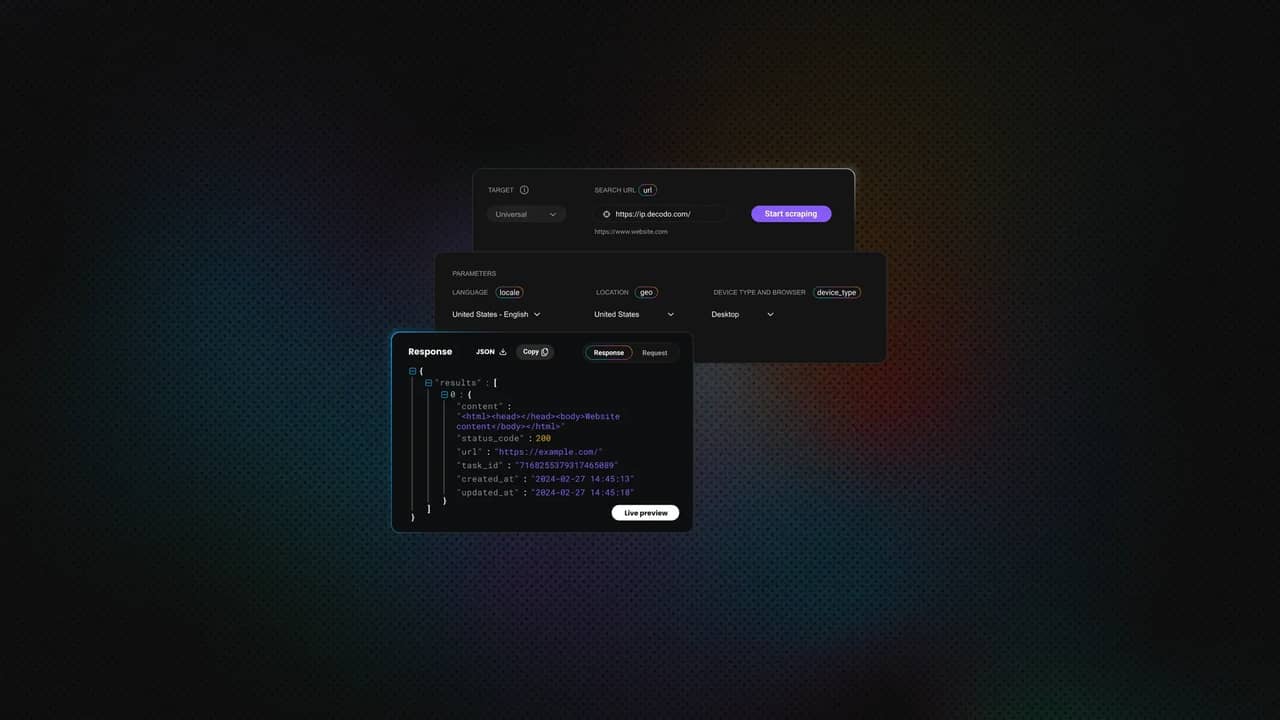
Decodo仪表板立即生成cURL、Node.js或Python中的代码。
你可以选中Markdown框,如果页面是动态的,则启用JS Rendering。你还可以配置高级参数(如代理位置、设备类型等)。
对于Python,单击仪表板中的Python选项卡以生成确切的代码。以下是实现:
import requestsurl = "https://scraper-api.decodo.com/v2/scrape"# Request the page in Markdown format directlypayload = {"url": "https://en.wikipedia.org/wiki/Google", "markdown": True}headers = {"accept": "application/json","content-type": "application/json","authorization": "Basic YOUR_AUTH_TOKEN",}# Send the requestresponse = requests.post(url, json=payload, headers=headers)# Print the clean Markdown contentprint(response.text)
响应直接返回干净的Markdown文本,可以保存或提供给LLM。
Google was founded on September 4, 1998, by American computer scientists [LarryPage](/wiki/Larry_Page "Larry Page") and [Sergey Brin](/wiki/Sergey_Brin "SergeyBrin"). Together, they own about 14% of its publicly listed shares and control56% of its stockholder voting power through [super-votingstock](/wiki/Super-voting_stock "Super-voting stock"). The company went[public](/wiki/Public_company "Public company") via an [initial publicoffering](/wiki/Initial_public_offering "Initial public offering") (IPO) in2004. In 2015, Google was reorganized as a wholly owned subsidiary of AlphabetInc. Google is Alphabet's largest subsidiary and is a [holdingcompany](/wiki/Holding_company "Holding company") for Alphabet's internetproperties and interests. [Sundar Pichai](/wiki/Sundar_Pichai "Sundar Pichai")was appointed CEO of Google on October 24, 2015, replacing Larry Page, whobecame the CEO of Alphabet. On December 3, 2019, Pichai also became the CEO ofAlphabet...[Response truncated for brevity]
功能
你的Python脚本
Decodo 网页抓取API
设置时间
小时(编码、调试、测试)
分钟(快速入门指南)
维护
高(HTML更改时中断)
最小(由Decodo管理基础设施)
可靠性
取决于你的本地IP声誉
企业级基础设施
可扩展性
受CPU/带宽限制
高并发请求容量
如何处理抓取的数据
你现在拥有相关维基百科主题的结构化数据集。以下是一些使用方法:
- 人工智能(AI)训练数据。Markdown文件和信息框为微调语言模型提供干净的文本
- 知识图谱。解析信息框以构建实体关系数据库
- 研究数据集。跨多篇文章分析表格数据以进行比较研究
- 内容分析。研究主题如何连接以及维基百科知识结构中出现的模式
对于超出单个文件的项目,考虑结构化存储解决方案,如数据库或数据仓库。
最佳实践
你现在拥有一个功能性的维基百科抓取器。为了保持其可靠运行,请遵循以下Web抓取最佳实践:
- 检查robots.txt。验证网站是否允许抓取
- 速率限制。保持启用延迟。我们包含time.sleep()是有原因的
- 识别自己。使用包含你的联系信息的自定义User-Agent
结论
你已经从简单的HTML解析器发展为探索维基百科知识图谱的爬虫,下一步很清楚。要扩展到实验之外,从文件转移到数据库,根据你的目标定制爬取逻辑,为数千页添加并行处理,并使用像Decodo这样的工具来处理真实世界规模带来的基础设施痛点。
关于作者

Justinas Tamasevicius
工程主管
Justinas Tamaševičius 是工程主管,在软件开发领域拥有二十多年的专业经验。从学生时代自学成才的激情开始,他的职业生涯跨越了后端工程、系统架构和基础架构开发等领域。
Justinas 目前负责领导工程部门,推动创新,提供高性能的解决方案,同时保持对效率和质量的高度关注。
通过 LinkedIn 与 Justinas 联系。
Decodo 博客上的所有信息均按原样提供,仅供参考。对于您使用 Decodo 博客上的任何信息或其中可能链接的任何第三方网站,我们不作任何陈述,也不承担任何责任。